本页出处
设计风格资料库
内容来自 luckymaomi 的 UI 风格库(复刻版),以 MIT 许可 提供。本站镜像收录,仅作学习参考;这一页的原始地址是 原站页面。
← 回到导览访问原站仓库
返回风格库
视觉风格expressive

吉卜力风格

Ghibli Style

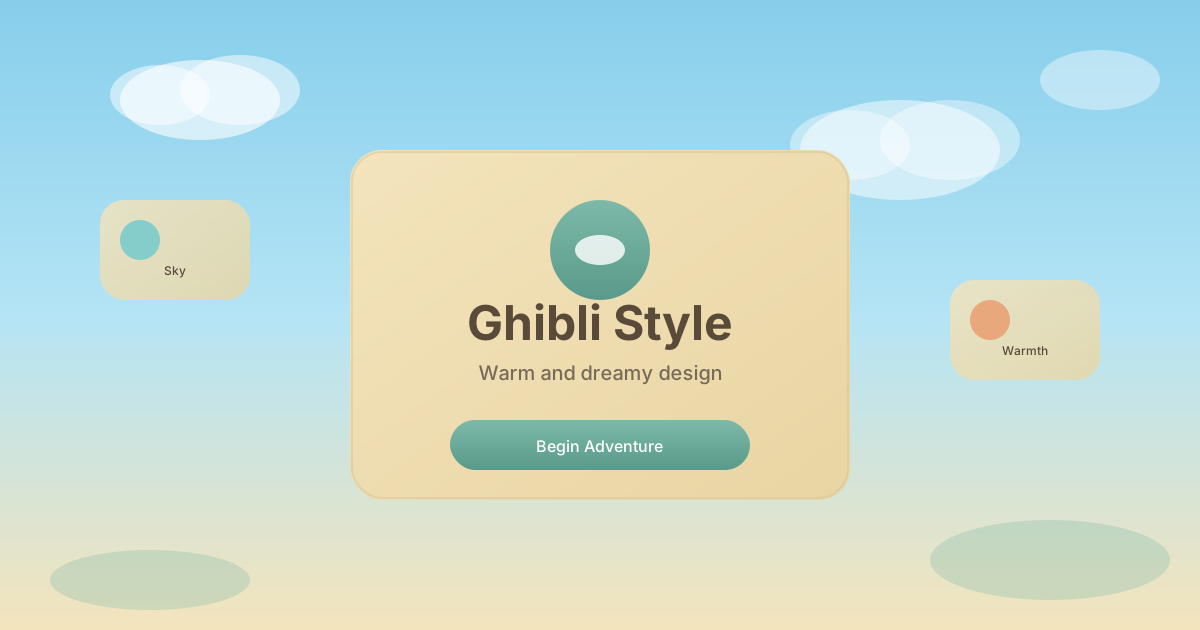
灵感源自吉卜力工作室动画的设计风格,温暖柔和的色调、手绘质感、自然元素和梦幻氛围,传递治愈与诗意。

吉卜力风格视觉预览
主色#7cb9a8
次色#f4e4bc
强调色 1#e8a87c
强调色 2#85cdca
强调色 3#c38d94
强调色 4#9ec069

AI 实现规则

你是一个 Ghibli Style 设计风格的前端开发专家。生成的所有代码必须严格遵守以下约束:

## 绝对禁止

- 使用锐利的直角边缘
- 使用高对比刺眼的配色
- 使用冰冷的科技感元素
- 过于复杂的动效

## 必须遵守

- 柔和色调 from-[#7cb9a8], bg-[#f4e4bc]
- 圆润形状 rounded-full, rounded-3xl, rounded-2xl
- 温和渐变 bg-gradient-to-b, bg-gradient-to-br
- 柔和阴影 shadow-[0_8px_30px_rgba(0,0,0,0.08)]
- 自然元素装饰

## 配色

主色调:
- 鼠尾草绿: #7cb9a8
- 奶油色: #f4e4bc
- 珊瑚橙: #e8a87c
- 天空蓝: #85cdca
- 玫瑰粉: #c38d94
- 深棕色: #5a4a3a (文字)

## 装饰元素

- 云朵形状
- 柔和的圆形
- 自然图案
- 渐变背景

## Animation & Interaction Rules

- Gentle Breeze: 悬停动画需轻柔克制,可使用微小浮动与低角度旋转(约 1deg 内)模拟自然风感。
- Watercolor Glow: 阴影应使用本体色的柔和扩散(如鼠尾草绿系),避免厚重黑影破坏水彩质地。
- Soft Cushion: 点击反馈使用温和按压(如 `active:scale-[0.98]`),避免机械式快速收缩。
- Magic Longing: 交互节奏建议 `duration-500` 到 `duration-700`,搭配 `ease-in-out` 保持童话般从容。

## Layout & Spacing
- Section padding: py-16 md:py-24
- Card padding: p-6 md:p-8
- Gap between cards: gap-6 md:gap-8
- Max content width: max-w-6xl mx-auto

## Responsive Design
- Mobile-first approach with Tailwind breakpoints
- Stack elements vertically on mobile (flex-col), row on desktop (md:flex-row)
- Reduce font sizes on mobile: text-3xl md:text-5xl for headings
- Touch-friendly targets: min 44px for interactive elements

## Self-Check Verification
After generating code, verify:
1. All interactive elements have hover/focus/active states
2. Color contrast meets WCAG 2.1 AA (4.5:1 for text)
3. Layout is responsive across breakpoints
4. Typography hierarchy is clear (h1 > h2 > h3 > body)
5. Spacing is consistent using the defined scale
6. All animations respect prefers-reduced-motion

组件预览与实现

font-medium rounded-2xl transition-all duration-300 bg-[#8B7355] text-white shadow-[0_4px_12px_rgba(139,115,85,0.3)] hover:shadow-[0_6px_20px_rgba(139,115,85,0.4)] hover:brightness-110 active:scale-[0.97]
button

按钮

吉卜力风格按钮

<button className="
  px-8 py-4
  bg-gradient-to-b from-[#85cdca] to-[#7cb9a8]
  text-white font-medium
  rounded-full
  border-2 border-[#5a9a8a]/25
  shadow-[0_8px_20px_rgba(124,185,168,0.3)]
  hover:shadow-[0_12px_30px_rgba(124,185,168,0.45)]
  hover:-translate-y-1 hover:scale-[1.01] hover:rotate-[0.8deg]
  active:scale-[0.98] active:rotate-0 active:translate-y-0
  transition-all duration-500 ease-in-out
">
  Begin Journey
</button>
card

卡片

吉卜力风格卡片

<div className="group p-8
  bg-gradient-to-br from-[#f4e4bc]/90 to-[#e8d5a3]/90
  rounded-3xl
  border border-[#d4c49a]/45
  shadow-[0_8px_30px_rgba(90,74,58,0.06)]
  hover:shadow-[0_16px_40px_rgba(124,185,168,0.18)]
  hover:-translate-y-1.5 hover:-rotate-[0.8deg] hover:scale-[1.01]
  transition-all duration-700 ease-in-out
  backdrop-blur-sm
">
  <div className="w-16 h-16 bg-gradient-to-br from-[#85cdca] to-[#7cb9a8] rounded-full flex items-center justify-center mb-6 shadow-inner group-hover:scale-105 group-hover:rotate-6 transition-all duration-500 ease-in-out">
    {/* Cloud icon */}
    <svg className="w-8 h-8 text-white" viewBox="0 0 24 24" fill="currentColor">
      <path d="M19.35 10.04C18.67 6.59 15.64 4 12 4 9.11 4 6.6 5.64 5.35 8.04 2.34 8.36 0 10.91 0 14c0 3.31 2.69 6 6 6h13c2.76 0 5-2.24 5-5 0-2.64-2.05-4.78-4.65-4.96z"/>
    </svg>
  </div>
  <h3 className="text-2xl font-semibold text-[#5a4a3a] mb-2 group-hover:text-[#7cb9a8] transition-colors duration-500">
    Sky Garden
  </h3>
  <p className="text-[#7a6a5a] leading-relaxed group-hover:text-[#5a4a3a] transition-colors duration-500">
    Where dreams float among the clouds, carried by the gentle wind of summer.
  </p>
</div>
input

输入框

吉卜力风格输入框

<input
  type="text"
  placeholder="Write your story..."
  className="
    w-full px-5 py-4
    bg-[#f4e4bc]/60
    border-2 border-[#d4c49a]/40
    rounded-2xl
    text-[#5a4a3a] placeholder-[#a89a7a]
    focus:outline-none focus:border-[#7cb9a8]
    focus:bg-[#f4e4bc]/80
    transition-all duration-300
  "
/>
hero

Hero 区块

吉卜力风格 Hero

<section className="
  min-h-screen
  bg-gradient-to-b from-[#87ceeb] via-[#b4e4f5] to-[#f4e4bc]
  relative overflow-hidden
  flex items-center justify-center
  px-6
">
  {/* Clouds */}
  <div className="absolute top-20 left-10 w-32 h-16 bg-white/60 rounded-full blur-sm" />
  <div className="absolute top-32 right-20 w-40 h-20 bg-white/50 rounded-full blur-sm" />
  <div className="absolute top-16 right-40 w-24 h-12 bg-white/40 rounded-full blur-sm" />

  <div className="relative z-10 text-center max-w-2xl">
    <h1 className="text-5xl md:text-7xl font-semibold text-[#5a4a3a] mb-6 leading-tight">
      A World of
      <br />
      <span className="text-[#7cb9a8]">Wonder</span>
    </h1>
    <p className="text-xl text-[#7a6a5a] mb-8 leading-relaxed">
      Where every journey begins with a single step into the magical unknown.
    </p>
    <button className="px-10 py-4 bg-gradient-to-b from-[#7cb9a8] to-[#5a9a8a] text-white font-medium rounded-full shadow-[0_4px_20px_rgba(124,185,168,0.4)] hover:-translate-y-1 transition-all duration-300">
      Start Adventure
    </button>
  </div>
</section>

交互展示

适用范围与设计理念

应用场景

creativemarketing

视觉关键词

retro吉卜力宫崎骏手绘治愈自然梦幻动画expressiveboldvibrant

Ghibli Style(吉卜力风格)受日本吉卜力工作室动画影响,以温暖、治愈、富有诗意的视觉语言著称。

核心理念:

- 手绘质感:保留手工绘制的温度和不完美

- 自然主题:云朵、森林、天空等自然元素

- 柔和色调:温暖的大地色系和天空色

- 梦幻氛围:创造宁静治愈的视觉体验

设计原则:

- 视觉一致性:所有组件必须遵循统一的视觉语言,从色彩到字体到间距保持谐调

- 层次分明:通过颜色深浅、字号大小、留白空间建立清晰的信息层级

- 交互反馈:每个可交互元素都必须有明确的 hover、active、focus 状态反馈

- 响应式适配:设计必须在移动端、平板、桌面端上保持一致的体验

- 无障碍性:确保色彩对比度符合 WCAG 2.1 AA 标准,所有交互元素可键盘访问

应该这样做

  • 使用柔和温暖的色调
  • 添加手绘风格的插图或边框
  • 融入自然元素(云、树、花)
  • 使用圆润柔和的形状
  • 添加微妙的纹理效果
  • 创造梦幻般的渐变背景
  • 交互动效保持微风感(duration-500 到 700,轻微浮动和小角度旋转)

避免这样做

  • 禁止使用过于锐利的边缘
  • 禁止使用高对比的刺眼配色
  • 禁止使用冰冷的科技感元素
  • 禁止过于复杂的动效
  • 禁止快速硬切与突兀的高频动效

全局 CSS

/* Ghibli Style 全局样式 */

:root {
  --ghibli-sage: #7cb9a8;
  --ghibli-cream: #f4e4bc;
  --ghibli-coral: #e8a87c;
  --ghibli-sky: #85cdca;
  --ghibli-rose: #c38d94;
  --ghibli-brown: #5a4a3a;
}

/* 柔和渐变背景 */
.ghibli-sky-gradient {
  background: linear-gradient(180deg, #87ceeb 0%, #b4e4f5 50%, #f4e4bc 100%);
}

/* 手绘风格边框 */
.ghibli-border {
  border: 2px solid rgba(212, 196, 154, 0.5);
  border-radius: 1.5rem;
}

/* 云朵样式 */
.ghibli-cloud {
  background: rgba(255, 255, 255, 0.5);
  border-radius: 9999px;
  filter: blur(4px);
}

/* 柔和阴影 */
.ghibli-shadow {
  box-shadow: 0 8px 30px rgba(0, 0, 0, 0.08);
}
@keyframes ghibli-style-fade-in {
  from { opacity: 0; transform: translateY(8px); }
  to { opacity: 1; transform: translateY(0); }
}

@keyframes ghibli-style-pulse {
  0%, 100% { opacity: 1; }
  50% { opacity: 0.7; }
}

.ghibli-style-card {
  position: relative;
  overflow: hidden;
}

.ghibli-style-card::before {
  content: "";
  position: absolute;
  inset: 0;
  opacity: 0;
  transition: opacity 0.3s ease;
  background: linear-gradient(135deg, rgba(124, 185, 168, 0.05), transparent);
  pointer-events: none;
}

.ghibli-style-card:hover::before {
  opacity: 1;
}

.ghibli-style-frosted {
  backdrop-filter: blur(12px) saturate(180%);
  -webkit-backdrop-filter: blur(12px) saturate(180%);
  background: rgba(124, 185, 168, 0.08);
}

.ghibli-style-accent-corner {
  clip-path: polygon(0 0, 100% 0, 100% calc(100% - 2rem), calc(100% - 2rem) 100%, 0 100%);
}

.ghibli-style-animate-in {
  animation: ghibli-style-fade-in 0.5s ease-out both;
}

布局、色板与 Tokens

主色#7cb9a8
次色#f4e4bc
强调色 1#e8a87c
强调色 2#85cdca
强调色 3#c38d94
强调色 4#9ec069
{
  "border": {
    "width": "border",
    "color": "border-[#7cb9a8]/40",
    "radius": "rounded-2xl",
    "style": "border-solid"
  },
  "shadow": {
    "sm": "shadow-[0_2px_8px_rgba(124,185,168,0.15)]",
    "md": "shadow-[0_4px_16px_rgba(124,185,168,0.2)]",
    "lg": "shadow-[0_8px_32px_rgba(124,185,168,0.25)]",
    "none": "shadow-none",
    "hover": "hover:shadow-[0_8px_24px_rgba(124,185,168,0.3)]",
    "focus": "focus:shadow-[0_4px_16px_rgba(124,185,168,0.25)]",
    "colored": {
      "sage": "shadow-[0_4px_16px_rgba(124,185,168,0.25)]",
      "cream": "shadow-[0_4px_16px_rgba(244,228,188,0.3)]",
      "brown": "shadow-[0_4px_16px_rgba(139,115,85,0.2)]"
    }
  },
  "interaction": {
    "transition": "transition-all duration-300 ease-out",
    "active": "active:scale-[0.98]",
    "hoverScale": "hover:scale-[1.02]"
  },
  "typography": {
    "heading": "font-sans font-semibold tracking-normal",
    "body": "font-sans",
    "mono": "font-mono",
    "sizes": {
      "hero": "text-3xl md:text-5xl lg:text-6xl",
      "h1": "text-2xl md:text-4xl",
      "h2": "text-xl md:text-3xl",
      "h3": "text-lg md:text-xl",
      "body": "text-sm md:text-base",
      "small": "text-xs md:text-sm"
    }
  },
  "spacing": {
    "section": "py-12 md:py-20 lg:py-28",
    "container": "px-4 md:px-8 lg:px-12",
    "card": "p-5 md:p-8",
    "gap": {
      "sm": "gap-3 md:gap-4",
      "md": "gap-4 md:gap-6",
      "lg": "gap-6 md:gap-8"
    }
  },
  "colors": {
    "background": {
      "primary": "bg-[#f4e4bc]",
      "secondary": "bg-[#7cb9a8]",
      "accent": [
        "bg-[#7cb9a8]",
        "bg-[#e8c07a]",
        "bg-[#d4a574]",
        "bg-[#8fb996]"
      ]
    },
    "text": {
      "primary": "text-[#3a3226]",
      "secondary": "text-[#5a4f42]",
      "muted": "text-[#8a7a6a]"
    },
    "button": {
      "primary": "bg-[#7cb9a8] text-white",
      "secondary": "bg-[#f4e4bc] text-[#3a3226] border border-[#7cb9a8]/40",
      "danger": "bg-[#c75050] text-white"
    }
  },
  "forbidden": {
    "classes": [
      "rounded-none",
      "border-black",
      "border-2",
      "border-4",
      "shadow-[2px_2px_0px",
      "shadow-[4px_4px_0px",
      "shadow-[8px_8px_0px",
      "bg-[#ff006e]",
      "bg-[#ff71ce]",
      "bg-[#01cdfe]",
      "bg-[#00ff00]",
      "text-[#ff006e]",
      "text-[#ff71ce]",
      "font-black",
      "bg-black",
      "bg-[#1a1a2e]"
    ],
    "patterns": [
      "^rounded-none$",
      "^shadow-\\[\\d+px_\\d+px_0px",
      "^bg-(?:black|\\[#(?:ff006e|ff71ce|01cdfe|00ff00)\\])",
      "^border-(?:black|4)$"
    ],
    "reasons": {
      "rounded-none": "Ghibli style uses soft rounded shapes (rounded-2xl) for a warm feel",
      "border-black": "Ghibli style uses subtle earth-toned borders, not harsh black",
      "shadow-[4px_4px_0px": "Ghibli style uses soft diffused shadows, not hard-edge",
      "bg-[#ff71ce]": "Ghibli style uses warm earth tones (sage, cream), not neon colors"
    }
  },
  "required": {
    "button": [
      "rounded-2xl",
      "shadow-[0_4px_16px_rgba(124,185,168,0.2)]",
      "hover:scale-[1.02]",
      "transition-all duration-300 ease-out",
      "font-semibold"
    ],
    "card": [
      "rounded-2xl",
      "border border-[#7cb9a8]/40",
      "shadow-[0_4px_16px_rgba(124,185,168,0.2)]",
      "bg-[#f4e4bc]"
    ],
    "input": [
      "rounded-2xl",
      "border border-[#7cb9a8]/40",
      "bg-[#faf5eb]",
      "text-[#3a3226]",
      "focus:shadow-[0_4px_16px_rgba(124,185,168,0.25)]",
      "focus:outline-none"
    ]
  }
}

示例提示词

治愈系个人博客

温暖治愈的个人博客

用 Ghibli Style 创建一个治愈系个人博客,要求:
1. 背景:天空到大地的柔和渐变
2. 装饰:云朵、自然元素
3. 配色:鼠尾草绿、奶油色、天空蓝
4. 圆润的卡片和按钮
5. 整体传递温暖治愈的感觉

SaaS 着陆页

生成 吉卜力风格风格的 SaaS 产品着陆页

Create a SaaS landing page using Ghibli Style style with hero section, feature grid, testimonials, pricing table, and footer.

作品集展示

生成 吉卜力风格风格的作品集页面

Create a portfolio showcase page using Ghibli Style style with project grid, about section, contact form, and consistent visual language.