本页出处
设计风格资料库
内容来自 luckymaomi 的 UI 风格库(复刻版),以 MIT 许可 提供。本站镜像收录,仅作学习参考;这一页的原始地址是 原站页面。
← 回到导览访问原站仓库
返回风格库
视觉风格modern

科幻HUD

Sci-Fi HUD

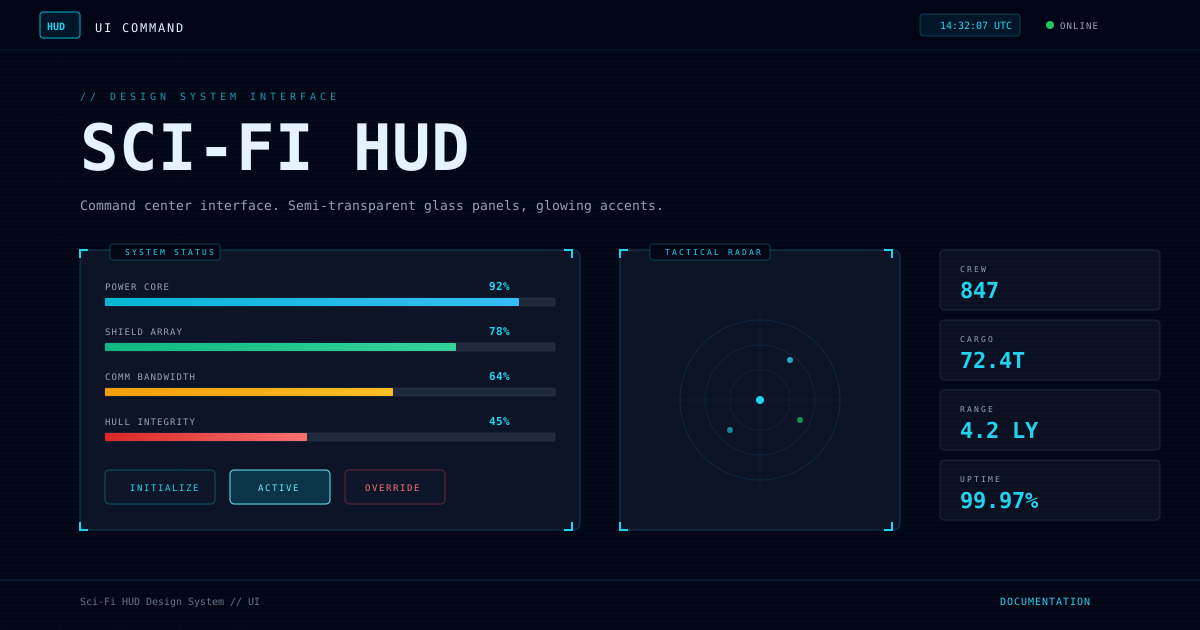
源自星际飞船驾驶舱和战术指挥中心的全息显示界面。深空背景、青色发光边框、半透明玻璃面板、雷达扫描动效,营造'正在操作高科技设备'的沉浸体验。

科幻HUD视觉预览
主色#06B6D4
次色#020617
强调色 1#0EA5E9
强调色 2#22D3EE
强调色 3#22C55E
强调色 4#9e74ff

AI 实现规则

STYLE: Sci-Fi HUD
TYPE: Futuristic command center interface

MUST USE:
- Deep space background: bg-[#020617] or bg-slate-950
- Semi-transparent panels: bg-slate-900/85 backdrop-blur-xl
- Cyan glow borders: border-cyan-500/30 shadow-[0_0_20px_rgba(6,182,212,0.5)]
- Independent full-border square markers on important panels
- font-mono uppercase tracking-wider for labels
- Status indicators with pulse animation
- Scanline overlays for tech atmosphere
- Progress bars with gradient fill and glow

MUST AVOID:
- Light/white backgrounds
- Warm color schemes (except for warning/danger status)
- Regular shadows (shadow-md, shadow-lg)
- Serif fonts
- Cute/rounded design language
- Large border-radius (rounded-2xl+)

COLOR SYSTEM:
- Background: #020617 (deep navy)
- Panel: rgba(15, 23, 42, 0.85) (translucent slate)
- Primary accent: #06B6D4 (cyan)
- Secondary accent: #0EA5E9 (bright blue)
- Highlight: #22D3EE (neon cyan)
- Success: #22C55E (green)
- Warning: #F97316 (orange)
- Danger: #EF4444 (red)
- Text primary: #E5F2FF
- Text secondary: #94A3B8

SPECIAL EFFECTS:
- Radar sweep rotation animation (6s linear infinite)
- Status pulse glow (2s ease-in-out)
- Data line slide-in animation
- Progress bar shine sweep
- Scanline repeating gradient overlay

## Animation & Interaction Rules
- Tactical Lock: hover 时四角 L 型角标需进行短促锁定位移(duration-150)。
- Data Overload: 悬停时提升扫描线可见度与发光强度,模拟数据过载。
- Holographic Pierce: active 状态优先高亮内发光反馈,不做重力式下沉。
- Terminal Blinking: 状态灯和关键提示保持脉冲或闪烁,维持系统在线感。

组件预览与实现

font-mono uppercase tracking-widest border transition-all duration-200 bg-cyan-500/10 text-cyan-400 border-cyan-500/40 shadow-[0_0_12px_rgba(34,211,238,0.2)] hover:bg-cyan-500/20 hover:border-cyan-400/60 active:scale-[0.98]
button

HUD 按钮

半透明发光边框按钮,悬停增强辉光

// Primary HUD Button
<button className="group relative px-8 py-3 bg-slate-900/80 border border-cyan-500/50 text-cyan-400 rounded-sm shadow-[0_0_10px_rgba(6,182,212,0.3)] hover:bg-cyan-500/10 hover:border-cyan-300 hover:text-cyan-300 hover:shadow-[0_0_20px_rgba(6,182,212,0.6),inset_0_0_10px_rgba(6,182,212,0.2)] active:scale-95 active:shadow-[inset_0_0_20px_rgba(255,255,255,0.6)] transition-all duration-150 ease-out overflow-hidden font-mono text-sm uppercase tracking-widest">
  <div className="absolute inset-0 bg-[repeating-linear-gradient(45deg,transparent,transparent_2px,rgba(6,182,212,0.1)_2px,rgba(6,182,212,0.1)_4px)] opacity-0 group-hover:opacity-100 transition-opacity duration-150" />
  <span className="relative z-10">Initialize</span>
</button>

// Active HUD Button
<button className="px-6 py-3 bg-cyan-500/20 border border-cyan-300 text-cyan-300 rounded-sm shadow-[0_0_20px_rgba(6,182,212,0.5)] font-mono text-sm uppercase tracking-widest">
  System Active
</button>

// Danger HUD Button
<button className="px-6 py-3 bg-slate-900/80 border border-red-500/40 text-red-400 rounded-sm shadow-[0_0_15px_rgba(239,68,68,0.3)] hover:border-red-400 hover:shadow-[0_0_25px_rgba(239,68,68,0.5)] transition-all duration-150 font-mono text-sm uppercase tracking-widest">
  Override
</button>
card

HUD 面板

半透明玻璃面板,带角标锁定和扫描线过载效果

<div className="group relative bg-slate-900/80 backdrop-blur-xl border border-cyan-500/20 rounded-sm p-8 shadow-[0_4px_24px_rgba(0,0,0,0.6)] hover:border-cyan-400/60 hover:shadow-[0_0_30px_rgba(6,182,212,0.25)] transition-all duration-200 cursor-crosshair">
  {/* Full-border square corner lock animation */}
  <div className="absolute top-0 left-0 w-4 h-4 border-2 border-2 border-cyan-500 group-hover:-translate-x-1 group-hover:-translate-y-1 group-hover:border-cyan-300 transition-all duration-150" />
  <div className="absolute top-0 right-0 w-4 h-4 border-2 border-2 border-cyan-500 group-hover:translate-x-1 group-hover:-translate-y-1 group-hover:border-cyan-300 transition-all duration-150" />
  <div className="absolute bottom-0 left-0 w-4 h-4 border-2 border-2 border-cyan-500 group-hover:-translate-x-1 group-hover:translate-y-1 group-hover:border-cyan-300 transition-all duration-150" />
  <div className="absolute bottom-0 right-0 w-4 h-4 border-2 border-2 border-cyan-500 group-hover:translate-x-1 group-hover:translate-y-1 group-hover:border-cyan-300 transition-all duration-150" />

  {/* Scanline overload */}
  <div className="absolute inset-0 bg-[repeating-linear-gradient(0deg,transparent,transparent_2px,rgba(148,163,184,0.03)_2px,rgba(148,163,184,0.03)_4px)] group-hover:opacity-80 pointer-events-none rounded-sm transition-opacity duration-150" />

  <div className="relative z-10">
    <div className="flex items-center gap-3 mb-5">
      <div className="w-2 h-2 bg-cyan-500 shadow-[0_0_8px_rgba(6,182,212,1)] group-hover:bg-cyan-300 group-hover:animate-pulse" />
      <h3 className="text-cyan-500 font-mono text-xs uppercase tracking-[0.2em] group-hover:text-cyan-300 transition-colors">
        System Module
      </h3>
    </div>
    <h4 className="text-white text-xl font-mono font-bold mb-3 group-hover:drop-shadow-[0_0_8px_rgba(255,255,255,0.5)] transition-all duration-200">
      Subsystem Status
    </h4>
    <p className="text-slate-400 text-sm font-mono leading-relaxed group-hover:text-slate-300 transition-colors duration-200">
      &gt; Quantum core operating at optimal efficiency.
      <br/>&gt; Awaiting command input...
    </p>
  </div>
</div>
input

HUD 输入框

深色背景输入框,发光聚焦效果

<div className="space-y-2">
  <label className="block text-cyan-400 font-mono text-xs uppercase tracking-widest">Access Code</label>
  <div className="relative">
    <input
      type="text"
      className="w-full px-4 py-3 bg-slate-950 border border-cyan-500/30 rounded text-[#E5F2FF] font-mono text-sm placeholder:text-slate-600 focus:outline-none focus:border-cyan-400 focus:shadow-[0_0_15px_rgba(6,182,212,0.3)] transition-all duration-300"
      placeholder="Enter command..."
    />
    <div className="absolute right-3 top-1/2 -translate-y-1/2 w-2 h-2 rounded-full bg-cyan-400 shadow-[0_0_10px_rgba(6,182,212,0.8)] animate-pulse" />
  </div>
</div>
nav

HUD 状态栏

顶部状态栏,显示系统名称、时间和状态指示器

<nav className="bg-[#020617]/95 backdrop-blur-sm border border-cyan-500/30 px-8 py-3 flex justify-between items-center">
  <div className="flex items-center gap-4">
    <div className="w-10 h-10 flex items-center justify-center text-cyan-300 font-mono font-bold text-sm bg-cyan-500/10 border-2 border-cyan-500 rounded shadow-[0_0_15px_rgba(6,182,212,0.4)]">
      HUD
    </div>
    <span className="text-[#E5F2FF] font-mono text-sm uppercase tracking-[0.15em]">Nexus Command</span>
  </div>
  <div className="flex items-center gap-6">
    <span className="text-cyan-400 font-mono text-sm bg-cyan-500/10 border border-cyan-500/30 rounded px-3 py-1">12:34:56 UTC</span>
    <div className="flex items-center gap-2">
      <div className="w-2.5 h-2.5 rounded-full bg-green-400 shadow-[0_0_10px_rgba(34,197,94,0.6)] animate-pulse" />
      <span className="text-slate-400 font-mono text-xs uppercase tracking-wider">Online</span>
    </div>
  </div>
</nav>

交互展示

适用范围与设计理念

应用场景

dashboardcreativemarketing

视觉关键词

high-contrast科幻HUD全息雷达指挥中心太空发光边框数据流moderncontemporary

Sci-Fi HUD 风格源自电影、游戏中的未来科技界面,核心在于"信息即界面"。

设计原则:

- 深空背景:极深的蓝灰色背景模拟太空指挥室

- 发光几何:所有元素使用青色/蓝绿色发光边框,创造全息投影感

- 信息密集:通过分层和模块化保持大量实时数据的可读性

- 实时动态:雷达扫描、数据流滚动、状态脉冲传递"系统运行中"的感觉

- 半透明材质:面板使用玻璃态效果 + 模糊背景

设计原则:

- 视觉一致性:所有组件必须遵循统一的视觉语言,从色彩到字体到间距保持谐调

- 层次分明:通过颜色深浅、字号大小、留白空间建立清晰的信息层级

- 交互反馈:每个可交互元素都必须有明确的 hover、active、focus 状态反馈

- 响应式适配:设计必须在移动端、平板、桌面端上保持一致的体验

- 无障碍性:确保色彩对比度符合 WCAG 2.1 AA 标准,所有交互元素可键盘访问

应该这样做

  • 背景使用深空色 bg-[#020617] 或 bg-slate-950
  • 面板使用半透明 bg-slate-900/85 backdrop-blur-xl
  • 边框使用发光效果 border-cyan-500/30 shadow-[0_0_20px_rgba(6,182,212,0.5)]
  • 文字使用冷色调 text-[#E5F2FF] 或 text-slate-300
  • 使用 font-mono uppercase tracking-wider 营造科技感
  • 角标装饰使用 L 型边框 border-2 border-2
  • 状态指示器使用发光脉冲动画
  • 进度条使用渐变填充 + 发光扫描效果
  • 交互时角标做锁定位移(收缩/外扩)以体现 Tactical Lock
  • 扫描线在 hover 时提升对比或位移,模拟数据过载
  • active 状态使用高亮内发光反馈全息点击而非重力下沉

避免这样做

  • 禁止使用浅色/白色背景
  • 禁止使用暖色调(橙、粉等暖色仅限警告状态)
  • 禁止使用普通阴影 shadow-md(必须是发光阴影)
  • 禁止使用衬线字体
  • 禁止使用圆润可爱的设计语言
  • 禁止大圆角 rounded-2xl+
  • 禁止面板交互只有普通阴影加深(缺少系统激活感)
  • 禁止状态灯静止不动(HUD 需持续脉冲或闪烁)

全局 CSS

/* Sci-Fi HUD Global Styles */
@layer base {
  body {
    background-color: #020617;
    color: #E5F2FF;
  }

  ::selection {
    background-color: rgba(6, 182, 212, 0.4);
    color: #E5F2FF;
  }
}

@keyframes hud-radar-sweep {
  from { transform: rotate(0deg); }
  to { transform: rotate(360deg); }
}

@keyframes hud-pulse {
  0%, 100% { opacity: 1; transform: scale(1); }
  50% { opacity: 0.6; transform: scale(1.2); }
}

@keyframes hud-data-slide {
  from { opacity: 0; transform: translateX(-10px); }
  to { opacity: 1; transform: translateX(0); }
}

@keyframes hud-bar-shine {
  from { left: -100%; }
  to { left: 100%; }
}
/* Sci-Fi HUD Design Tokens */
:root {
  --sci-fi-hud-primary: #06B6D4;
  --sci-fi-hud-secondary: #020617;
  --sci-fi-hud-accent: #0EA5E9;
  --sci-fi-hud-glow: rgba(6, 182, 212, 0.3);
}

.sci-fi-hud-card {
  position: relative;
  overflow: hidden;
}

.sci-fi-hud-card::before {
  content: "";
  position: absolute;
  inset: 0;
  opacity: 0;
  transition: opacity 0.3s ease;
  background: linear-gradient(135deg, rgba(6, 182, 212, 0.05), transparent);
  pointer-events: none;
}

.sci-fi-hud-card:hover::before {
  opacity: 1;
}

.sci-fi-hud-gradient {
  background: linear-gradient(135deg, #06B6D4, #0EA5E9);
}

.sci-fi-hud-gradient-text {
  background: linear-gradient(135deg, #06B6D4, #0EA5E9);
  -webkit-background-clip: text;
  -webkit-text-fill-color: transparent;
  background-clip: text;
}

.sci-fi-hud-frosted {
  backdrop-filter: blur(12px) saturate(180%);
  -webkit-backdrop-filter: blur(12px) saturate(180%);
  background: rgba(6, 182, 212, 0.08);
}

.sci-fi-hud-accent-corner {
  clip-path: polygon(0 0, 100% 0, 100% calc(100% - 2rem), calc(100% - 2rem) 100%, 0 100%);
}

.sci-fi-hud-animate-in {
  animation: sci-fi-hud-fade-in 0.5s ease-out both;
}

布局、色板与 Tokens

主色#06B6D4
次色#020617
强调色 1#0EA5E9
强调色 2#22D3EE
强调色 3#22C55E
强调色 4#9e74ff
{
  "border": {
    "width": "border",
    "color": "border-cyan-500/30",
    "radius": "rounded",
    "style": "border-solid"
  },
  "shadow": {
    "sm": "shadow-[0_0_10px_rgba(6,182,212,0.2)]",
    "md": "shadow-[0_0_15px_rgba(6,182,212,0.3)]",
    "lg": "shadow-[0_0_25px_rgba(6,182,212,0.5)]",
    "none": "shadow-none",
    "hover": "shadow-[0_0_25px_rgba(6,182,212,0.5)]",
    "focus": "shadow-[0_0_20px_rgba(6,182,212,0.4)]",
    "colored": {
      "cyan": "shadow-[0_0_20px_rgba(6,182,212,0.5)]",
      "green": "shadow-[0_0_20px_rgba(34,197,94,0.5)]",
      "red": "shadow-[0_0_20px_rgba(239,68,68,0.5)]"
    }
  },
  "interaction": {
    "transition": "transition-all duration-300",
    "active": "active:scale-95",
    "hoverScale": "hover:shadow-[0_0_25px_rgba(6,182,212,0.5)] hover:-translate-y-0.5"
  },
  "typography": {
    "heading": "font-bold font-mono",
    "body": "font-mono",
    "mono": "font-mono",
    "sizes": {
      "hero": "text-4xl md:text-6xl lg:text-7xl",
      "h1": "text-3xl md:text-4xl",
      "h2": "text-2xl md:text-3xl",
      "h3": "text-lg md:text-xl",
      "body": "text-sm",
      "small": "text-xs"
    }
  },
  "spacing": {
    "section": "py-12 md:py-20",
    "container": "px-6 md:px-8",
    "card": "p-6",
    "gap": {
      "sm": "gap-3",
      "md": "gap-6",
      "lg": "gap-8"
    }
  },
  "colors": {
    "background": {
      "primary": "bg-[#020617]",
      "secondary": "bg-slate-900/85",
      "accent": [
        "bg-cyan-500/20",
        "bg-sky-500/20",
        "bg-green-500/20"
      ]
    },
    "text": {
      "primary": "text-[#E5F2FF]",
      "secondary": "text-slate-400",
      "muted": "text-slate-500"
    },
    "button": {
      "primary": "bg-slate-900/80 border-cyan-500/40 text-cyan-400",
      "secondary": "bg-transparent border-slate-600 text-slate-300",
      "danger": "bg-red-500/20 border-red-500/40 text-red-400"
    }
  },
  "forbidden": {
    "classes": [
      "bg-white",
      "bg-gray-50",
      "bg-gray-100",
      "shadow-sm",
      "shadow-md",
      "shadow-lg",
      "shadow-xl",
      "rounded-2xl",
      "rounded-3xl",
      "rounded-full",
      "font-serif",
      "text-pink-",
      "text-rose-",
      "bg-pink-",
      "bg-rose-"
    ],
    "patterns": [
      "^bg-white",
      "^shadow-(?!\\[|none)",
      "^rounded-(?:2xl|3xl|full)",
      "^font-serif"
    ],
    "reasons": {
      "bg-white": "HUD interfaces require deep dark backgrounds",
      "shadow-md": "Must use glow shadows (shadow-[0_0_Xpx_rgba(...)]) not standard shadows",
      "rounded-2xl": "HUD panels use sharp or slightly rounded corners only",
      "font-serif": "HUD interfaces use monospace fonts exclusively"
    }
  },
  "required": {
    "button": [
      "font-mono",
      "uppercase",
      "tracking-widest",
      "border",
      "transition-all"
    ],
    "card": [
      "backdrop-blur",
      "border",
      "relative"
    ],
    "input": [
      "bg-slate-950",
      "border",
      "font-mono",
      "focus:outline-none"
    ]
  }
}

示例提示词

指挥中心仪表盘

包含系统状态、雷达扫描、数据流和资源指标

Create a command center dashboard using Sci-Fi HUD style:
- Deep space dark background with scanline overlay
- Top status bar with system name, time, and connection indicator
- Left panel: System status with glowing progress bars
- Right panel: Real-time data stream log with color-coded entries
- Bottom: Control buttons with hover glow effects
- Independent full-border square corner markers on all major panels
- Cyan/teal color scheme with status colors

SaaS 着陆页

生成 科幻HUD风格的 SaaS 产品着陆页

Create a SaaS landing page using Sci-Fi HUD style with hero section, feature grid, testimonials, pricing table, and footer.

作品集展示

生成 科幻HUD风格的作品集页面

Create a portfolio showcase page using Sci-Fi HUD style with project grid, about section, contact form, and consistent visual language.