本页出处
设计风格资料库
内容来自 luckymaomi 的 UI 风格库(复刻版),以 MIT 许可 提供。本站镜像收录,仅作学习参考;这一页的原始地址是 原站页面。
← 回到导览访问原站仓库
返回风格库
视觉风格modern

暖色仪表盘

Warm Dashboard

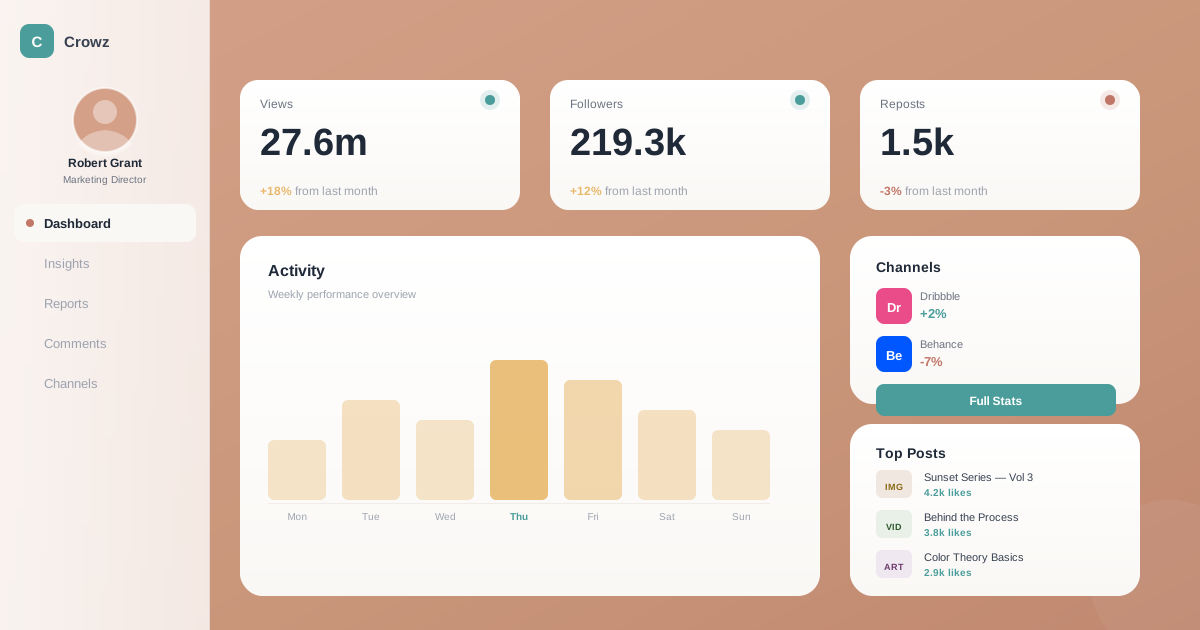
温暖柔和的仪表盘设计风格,采用珊瑚/赤陶色背景、奶油白卡片、柔和阴影,营造舒适专业的数据展示体验。

暖色仪表盘视觉预览
主色#d4a088
次色#faf8f5
强调色 1#4a9d9a
强调色 2#e8b86d
强调色 3#c17767
强调色 4#6b8e8e

AI 实现规则

你是一个 Warm Dashboard(暖色仪表盘)设计风格的前端开发专家。

## 核心特征

背景:
- 主背景:bg-[#d4a088] 珊瑚/赤陶色
- 可选变体:bg-[#c9967a] 更深、bg-[#e0b8a4] 更浅

卡片:
- 背景:bg-[#faf8f5] 奶油白 或 bg-white
- 圆角:rounded-2xl 或 rounded-3xl
- 阴影:shadow-xl shadow-black/8(柔和漫射)
- hover:hover:shadow-2xl hover:-translate-y-1

配色系统:
- 青绿(主要强调):#4a9d9a - 用于主按钮、正向数据
- 金黄(图表主色):#e8b86d - 用于图表、高亮
- 珊瑚(次要强调):#c17767 - 用于负向数据、警告
- 灰绿(辅助):#6b8e8e - 用于次要元素

文字:
- 标题:text-gray-800 font-semibold/bold
- 正文:text-gray-600
- 次要:text-gray-500 text-gray-400
- 暖背景上:text-white

## 布局

侧边栏:
- bg-white/80 backdrop-blur-xl
- 宽度 w-60
- 包含 logo、头像、导航

主区域:
- bg-[#d4a088] 暖色背景
- p-6 md:p-8 lg:p-10
- 统计卡片网格 + 图表卡片

## 禁止

- 冷色背景(蓝、紫、灰)
- 纯黑文字
- 尖锐边角
- 硬边阴影
- 霓虹色
- 粗边框

## Animation & Interaction Rules
- Micro-Focus: 作为数据密集的仪表盘,卡片交互绝不能引发剧烈的视觉跳跃。悬停时仅允许极轻微的上浮(`hover:-translate-y-0.5`),并通过增强阴影(`shadow-xl` 变 `shadow-2xl`)来聚焦视线。
- Tinted Diffusion: 抛弃死黑色的阴影。悬停高光操作(如主按钮)时,必须散发出与主色同色系的柔和光晕(如 `hover:shadow-[0_8px_20px_rgba(74,157,154,0.25)]`),维持整体的温暖氛围。
- Data Pulse: 增强数据易读性。当悬停在数据卡片上时,可令内部的关键指标(KPI 数值)快速地微量放大(`group-hover:scale-105`)或切换为强调色(青绿或金黄),帮助用户锁定核心信息。
- Warm Utility: 所有状态过渡需兼顾高效与柔和,推荐使用 `duration-200 ease-out`。

组件预览与实现

font-medium rounded-xl shadow-lg transition-all duration-200 bg-[#4a9d9a] text-white shadow-lg shadow-[#4a9d9a]/25 hover:shadow-xl hover:-translate-y-0.5 active:scale-[0.98]
button

按钮

暖色仪表盘风格按钮,柔和圆角配合点缀色

<button className="px-6 py-3 bg-[#4a9d9a] text-white rounded-xl shadow-[0_4px_12px_rgba(74,157,154,0.2)] hover:bg-[#3d8380] hover:shadow-[0_8px_20px_rgba(74,157,154,0.3)] hover:-translate-y-0.5 active:scale-[0.98] active:translate-y-0 active:shadow-[0_2px_8px_rgba(74,157,154,0.2)] transition-all duration-200 ease-out font-medium">
  Generate Report
</button>
card

卡片

奶油白卡片,大圆角柔和阴影

<div className="group bg-[#faf8f5] rounded-3xl shadow-[0_8px_24px_rgba(0,0,0,0.04)] border border-transparent p-6 md:p-8 hover:shadow-[0_16px_40px_rgba(0,0,0,0.08)] hover:border-gray-100 hover:-translate-y-1 transition-all duration-300 ease-out cursor-pointer">
  <div className="flex items-center justify-between mb-4">
    <span className="text-gray-500 text-sm font-medium group-hover:text-gray-700 transition-colors duration-200">Total Revenue</span>
    <span className="flex h-3 w-3">
      <span className="animate-ping absolute inline-flex h-full w-full rounded-full bg-[#4a9d9a] opacity-20 group-hover:opacity-40" />
      <span className="relative inline-flex rounded-full h-3 w-3 bg-[#4a9d9a]" />
    </span>
  </div>
  {/* 数据联动跳动 */}
  <p className="text-4xl font-bold text-gray-800 mb-2 transform origin-left group-hover:scale-105 group-hover:text-[#4a9d9a] transition-all duration-200 ease-out">
    $142,300
  </p>
  <p className="text-sm text-gray-400 group-hover:text-gray-500 transition-colors">
    <span className="text-[#e8b86d] font-semibold">+12%</span> from last month
  </p>
</div>
input

输入框

柔和背景的输入框

<div className="space-y-2">
  <label className="block text-sm font-medium text-gray-600">Search</label>
  <input
    type="text"
    placeholder="Search reports..."
    className="
      w-full px-4 py-3
      bg-white
      border border-gray-200
      rounded-xl
      text-gray-800
      placeholder:text-gray-400
      focus:outline-none focus:ring-2 focus:ring-[#4a9d9a]/30
      focus:border-[#4a9d9a]
      transition-all duration-200
    "
  />
</div>
nav

侧边栏

半透明白色侧边栏导航

<aside className="
  w-60 h-screen
  bg-white/80 backdrop-blur-xl
  border border-gray-200/50
  p-6
  flex flex-col
">
  {/* Logo */}
  <div className="flex items-center gap-2 mb-8">
    <div className="w-8 h-8 bg-[#4a9d9a] rounded-lg flex items-center justify-center">
      <span className="text-white font-bold text-sm">C</span>
    </div>
    <span className="font-semibold text-gray-800">Crowz</span>
  </div>

  {/* Avatar */}
  <div className="text-center mb-8">
    <div className="w-20 h-20 rounded-full bg-[#d4a088] mx-auto mb-3 overflow-hidden">
      <img src="/avatar.jpg" alt="User" className="w-full h-full object-cover" />
    </div>
    <p className="font-semibold text-gray-800">Robert Grant</p>
    <p className="text-sm text-gray-500">Marketing Director</p>
  </div>

  {/* Navigation */}
  <nav className="flex-1">
    <a href="#" className="
      flex items-center gap-3 px-4 py-3
      bg-[#faf8f5] rounded-xl
      text-gray-800 font-medium
      mb-2
    ">
      <span className="w-2 h-2 rounded-full bg-[#c17767]" />
      Dashboard
    </a>
    <a href="#" className="
      flex items-center gap-3 px-4 py-3
      text-gray-500
      hover:bg-[#faf8f5] hover:text-gray-800
      rounded-xl
      transition-colors duration-200
    ">
      Insights
    </a>
    <a href="#" className="
      flex items-center gap-3 px-4 py-3
      text-gray-500
      hover:bg-[#faf8f5] hover:text-gray-800
      rounded-xl
      transition-colors duration-200
    ">
      Reports
    </a>
  </nav>
</aside>
hero

仪表盘主区域

暖色背景的仪表盘主内容区

<main className="
  flex-1
  bg-[#d4a088]
  p-6 md:p-8 lg:p-10
  min-h-screen
">
  {/* 标题栏 */}
  <div className="flex items-center justify-between mb-8">
    <h1 className="text-2xl md:text-3xl font-bold text-white">Dashboard</h1>
    <div className="flex items-center gap-3">
      <button className="w-10 h-10 bg-white/20 rounded-xl flex items-center justify-center text-white">
        <Bell className="w-5 h-5" />
      </button>
      <button className="w-10 h-10 bg-white/20 rounded-xl flex items-center justify-center text-white">
        <Settings className="w-5 h-5" />
      </button>
    </div>
  </div>

  {/* 统计卡片网格 */}
  <div className="grid grid-cols-1 md:grid-cols-3 gap-4 md:gap-6 mb-8">
    <div className="bg-[#faf8f5] rounded-2xl p-6 shadow-xl shadow-black/8">
      <p className="text-gray-500 text-sm mb-2">Views</p>
      <p className="text-3xl font-bold text-gray-800">27,6m</p>
    </div>
    <div className="bg-[#faf8f5] rounded-2xl p-6 shadow-xl shadow-black/8">
      <p className="text-gray-500 text-sm mb-2">Followers</p>
      <p className="text-3xl font-bold text-gray-800">219,3k</p>
    </div>
    <div className="bg-[#faf8f5] rounded-2xl p-6 shadow-xl shadow-black/8">
      <p className="text-gray-500 text-sm mb-2">Reposts</p>
      <p className="text-3xl font-bold text-gray-800">1,5k</p>
    </div>
  </div>

  {/* 主内容卡片 */}
  <div className="bg-[#faf8f5] rounded-3xl p-6 md:p-8 shadow-xl shadow-black/8">
    <h2 className="text-xl font-semibold text-gray-800 mb-6">Activity</h2>
    {/* 图表区域 */}
    <div className="h-64 flex items-end gap-2">
      {/* 简化的柱状图 */}
      <div className="flex-1 bg-[#e8b86d]/20 rounded-t-lg" style={{height: '40%'}} />
      <div className="flex-1 bg-[#e8b86d]/20 rounded-t-lg" style={{height: '60%'}} />
      <div className="flex-1 bg-[#e8b86d]/20 rounded-t-lg" style={{height: '45%'}} />
      <div className="flex-1 bg-[#e8b86d] rounded-t-lg" style={{height: '80%'}} />
      <div className="flex-1 bg-[#e8b86d]/20 rounded-t-lg" style={{height: '70%'}} />
    </div>
  </div>
</main>
footer

底部栏

渠道统计底部卡片

<div className="
  bg-gradient-to-r from-[#e8f4f4] to-[#f0f7f7]
  rounded-2xl md:rounded-3xl
  p-5 md:p-6
  shadow-lg shadow-black/5
">
  <div className="flex flex-col md:flex-row items-start md:items-center justify-between gap-4">
    <div>
      <h3 className="font-semibold text-gray-800 mb-1">Channels</h3>
      <p className="text-sm text-gray-500">Your channels statistics for 1 week period.</p>
    </div>
    <div className="flex flex-wrap gap-3">
      <div className="flex items-center gap-2 bg-white rounded-xl px-4 py-2 shadow-sm">
        <div className="w-8 h-8 bg-[#ea4c89] rounded-lg flex items-center justify-center">
          <span className="text-white text-xs font-bold">Dr</span>
        </div>
        <div>
          <p className="text-xs text-gray-500">Dribbble</p>
          <p className="text-sm font-semibold text-[#4a9d9a]">+2%</p>
        </div>
      </div>
      <div className="flex items-center gap-2 bg-white rounded-xl px-4 py-2 shadow-sm">
        <div className="w-8 h-8 bg-[#0057ff] rounded-lg flex items-center justify-center">
          <span className="text-white text-xs font-bold">Be</span>
        </div>
        <div>
          <p className="text-xs text-gray-500">Behance</p>
          <p className="text-sm font-semibold text-[#c17767]">-7%</p>
        </div>
      </div>
      <button className="bg-[#4a9d9a] text-white rounded-xl px-4 py-2 font-medium text-sm">
        Full Stats
      </button>
    </div>
  </div>
</div>

交互展示

适用范围与设计理念

应用场景

dashboardadminsaas

视觉关键词

暖色仪表盘珊瑚色赤陶奶油白数据可视化舒适moderncontemporarysleek

Warm Dashboard(暖色仪表盘)是一种温暖、专业的界面设计风格,通过暖色调背景和柔和的卡片设计,让数据展示更加亲和友好。

核心理念:

- 温暖舒适:珊瑚/赤陶色背景传递温暖感

- 清晰层次:奶油白卡片在暖色背景上形成清晰对比

- 柔和触感:大圆角、漫射阴影营造柔软视觉

- 专业可读:深灰文字确保数据可读性

- 点缀色彩:青绿、金黄作为数据高亮和图表色

设计原则:

- 视觉一致性:所有组件必须遵循统一的视觉语言,从色彩到字体到间距保持谐调

- 层次分明:通过颜色深浅、字号大小、留白空间建立清晰的信息层级

- 交互反馈:每个可交互元素都必须有明确的 hover、active、focus 状态反馈

- 响应式适配:设计必须在移动端、平板、桌面端上保持一致的体验

- 无障碍性:确保色彩对比度符合 WCAG 2.1 AA 标准,所有交互元素可键盘访问

应该这样做

  • 背景使用暖色调 bg-[#d4a088] 或 bg-[#c9967a]
  • 卡片使用奶油白 bg-[#faf8f5] 或 bg-white
  • 使用大圆角 rounded-2xl 或 rounded-3xl
  • 使用柔和漫射阴影 shadow-xl shadow-black/10
  • 图表使用青绿 #4a9d9a 和金黄 #e8b86d 配色
  • 文字使用深灰 text-gray-800 或 text-gray-600
  • 侧边栏使用半透明白色 bg-white/80 backdrop-blur
  • 数据高亮使用点缀色圆形背景

避免这样做

  • 禁止使用冷色背景(蓝色、紫色)
  • 禁止使用纯黑文字 text-black
  • 禁止使用尖锐边角 rounded-none rounded-sm
  • 禁止使用硬边阴影
  • 禁止使用高饱和度霓虹色
  • 禁止使用粗边框 border-2 及以上

全局 CSS

/* Warm Dashboard 全局样式 */
:root {
  --warm-bg: #d4a088;
  --warm-bg-light: #e0b8a4;
  --warm-card: #faf8f5;
  --warm-teal: #4a9d9a;
  --warm-gold: #e8b86d;
  --warm-coral: #c17767;
  --warm-sage: #6b8e8e;
}

body {
  background: var(--warm-bg);
  color: #374151;
}

/* 卡片基础样式 */
.warm-card {
  background: var(--warm-card);
  border-radius: 1rem;
  box-shadow: 0 20px 25px -5px rgba(0, 0, 0, 0.08);
}

/* 侧边栏毛玻璃 */
.warm-sidebar {
  background: rgba(255, 255, 255, 0.8);
  backdrop-filter: blur(16px);
  -webkit-backdrop-filter: blur(16px);
}

/* 数据高亮 */
.warm-highlight {
  color: var(--warm-teal);
}

.warm-highlight-negative {
  color: var(--warm-coral);
}

/* 图表颜色 */
.warm-chart-primary {
  fill: var(--warm-gold);
}

.warm-chart-secondary {
  fill: var(--warm-teal);
}
@keyframes warm-dashboard-fade-in {
  from { opacity: 0; transform: translateY(8px); }
  to { opacity: 1; transform: translateY(0); }
}

@keyframes warm-dashboard-pulse {
  0%, 100% { opacity: 1; }
  50% { opacity: 0.7; }
}

.warm-dashboard-card {
  position: relative;
  overflow: hidden;
}

.warm-dashboard-card::before {
  content: "";
  position: absolute;
  inset: 0;
  opacity: 0;
  transition: opacity 0.3s ease;
  background: linear-gradient(135deg, rgba(212, 160, 136, 0.05), transparent);
  pointer-events: none;
}

.warm-dashboard-card:hover::before {
  opacity: 1;
}

.warm-dashboard-gradient {
  background: linear-gradient(135deg, #d4a088, #4a9d9a);
}

.warm-dashboard-gradient-text {
  background: linear-gradient(135deg, #d4a088, #4a9d9a);
  -webkit-background-clip: text;
  -webkit-text-fill-color: transparent;
  background-clip: text;
}

.warm-dashboard-accent-corner {
  clip-path: polygon(0 0, 100% 0, 100% calc(100% - 2rem), calc(100% - 2rem) 100%, 0 100%);
}

.warm-dashboard-animate-in {
  animation: warm-dashboard-fade-in 0.5s ease-out both;
}

布局、色板与 Tokens

主色#d4a088
次色#faf8f5
强调色 1#4a9d9a
强调色 2#e8b86d
强调色 3#c17767
强调色 4#6b8e8e
{
  "border": {
    "width": "border",
    "color": "border-gray-200/50",
    "radius": "rounded-2xl",
    "style": "border-solid"
  },
  "shadow": {
    "sm": "shadow-lg shadow-black/5",
    "md": "shadow-xl shadow-black/8",
    "lg": "shadow-2xl shadow-black/10",
    "none": "shadow-none",
    "hover": "hover:shadow-2xl hover:-translate-y-1",
    "focus": "focus:ring-2 focus:ring-[#4a9d9a]/30",
    "colored": {
      "teal": "shadow-lg shadow-[#4a9d9a]/25",
      "coral": "shadow-lg shadow-[#c17767]/25",
      "gold": "shadow-lg shadow-[#e8b86d]/25"
    }
  },
  "interaction": {
    "transition": "transition-all duration-200",
    "active": "active:scale-[0.98]",
    "hoverOpacity": "hover:-translate-y-0.5"
  },
  "typography": {
    "heading": "font-semibold text-gray-800",
    "body": "text-gray-600",
    "mono": "font-mono text-gray-700",
    "sizes": {
      "hero": "text-3xl md:text-4xl",
      "h1": "text-2xl md:text-3xl",
      "h2": "text-xl md:text-2xl",
      "h3": "text-lg md:text-xl",
      "body": "text-sm md:text-base",
      "small": "text-xs"
    }
  },
  "spacing": {
    "section": "py-12 md:py-16",
    "container": "px-6 md:px-8 lg:px-10",
    "card": "p-5 md:p-6 lg:p-8",
    "gap": {
      "sm": "gap-3",
      "md": "gap-4 md:gap-6",
      "lg": "gap-6 md:gap-10"
    }
  },
  "colors": {
    "background": {
      "primary": "bg-[#d4a088]",
      "secondary": "bg-[#faf8f5]",
      "accent": [
        "bg-[#4a9d9a]",
        "bg-[#e8b86d]",
        "bg-[#c17767]",
        "bg-[#6b8e8e]"
      ]
    },
    "text": {
      "primary": "text-gray-800",
      "secondary": "text-gray-600",
      "muted": "text-gray-400"
    },
    "button": {
      "primary": "bg-[#4a9d9a] text-white",
      "secondary": "bg-white text-gray-700"
    }
  },
  "forbidden": {
    "classes": [
      "bg-blue-500",
      "bg-blue-600",
      "bg-purple-500",
      "bg-purple-600",
      "text-black",
      "rounded-none",
      "rounded-sm",
      "shadow-[0px_0px_0px",
      "border-2",
      "border-4",
      "bg-[#00ffff]",
      "bg-[#ff00ff]",
      "text-[#00ffff]"
    ],
    "patterns": [
      "^rounded-none$",
      "^rounded-sm$",
      "^text-black$",
      "^border-[2-4]$"
    ],
    "reasons": {
      "rounded-none": "Warm Dashboard uses large rounded corners (rounded-2xl or rounded-3xl)",
      "rounded-sm": "Warm Dashboard uses large rounded corners (rounded-2xl or rounded-3xl)",
      "text-black": "Warm Dashboard uses text-gray-800 for primary text, not pure black",
      "border-2": "Warm Dashboard uses subtle single-pixel borders",
      "bg-blue-500": "Warm Dashboard uses warm color palette, avoid cold backgrounds"
    }
  },
  "required": {
    "button": [
      "px-5 py-2.5 md:px-6 md:py-3",
      "rounded-xl",
      "shadow-lg",
      "hover:shadow-xl hover:-translate-y-0.5",
      "transition-all duration-200",
      "font-medium text-sm md:text-base"
    ],
    "card": [
      "bg-[#faf8f5]",
      "rounded-2xl md:rounded-3xl",
      "shadow-xl shadow-black/8",
      "p-5 md:p-6 lg:p-8",
      "hover:shadow-2xl hover:-translate-y-1",
      "transition-all duration-300"
    ],
    "input": [
      "w-full px-4 py-3",
      "bg-white",
      "border border-gray-200",
      "rounded-xl",
      "text-gray-800",
      "placeholder:text-gray-400",
      "focus:outline-none focus:ring-2 focus:ring-[#4a9d9a]/30",
      "focus:border-[#4a9d9a]",
      "transition-all duration-200"
    ]
  }
}

示例提示词

社交媒体数据仪表盘

展示粉丝、互动、增长等数据

用 Warm Dashboard 风格创建一个社交媒体分析仪表盘,要求:

## 布局
- 左侧:半透明白色侧边栏 bg-white/80 backdrop-blur-xl
- 右侧:珊瑚色主区域 bg-[#d4a088]

## 侧边栏
- Logo + 品牌名
- 用户头像(圆形,珊瑚色边框)
- 导航菜单:Dashboard、Insights、Reports、Comments、Channels
- 当前页高亮:bg-[#faf8f5] + 左侧小圆点

## 主区域
- 顶部:标题 + 通知/设置图标
- 统计卡片行(3列):Views、Followers、Reposts
- 活动图表卡片:折线图,金黄色 #e8b86d
- Top Performers 列表
- 底部渠道统计条

## 数据可视化
- 正向数据:text-[#4a9d9a]
- 负向数据:text-[#c17767]
- 图表主色:#e8b86d

项目管理仪表盘

任务进度、团队成员、截止日期

用 Warm Dashboard 风格创建一个项目管理仪表盘,要求:

## 背景
- 主区域:bg-[#d4a088]
- 卡片:bg-[#faf8f5] rounded-3xl shadow-xl

## 组件
1. 项目概览卡片:进度环形图、完成百分比
2. 任务列表:复选框、优先级标签、截止日期
3. 团队成员:头像堆叠、在线状态
4. 时间线:垂直时间轴、里程碑节点

## 配色
- 完成状态:#4a9d9a 青绿
- 进行中:#e8b86d 金黄
- 延期:#c17767 珊瑚
- 未开始:#9ca3af 灰色

财务数据仪表盘

收入支出、趋势图表、预算对比

用 Warm Dashboard 风格创建一个个人财务仪表盘,要求:

## 布局
- 珊瑚色背景 bg-[#d4a088]
- 奶油白卡片 bg-[#faf8f5]

## 数据卡片
1. 总资产卡片:大数字、增长趋势
2. 收入/支出对比:柱状图
3. 分类饼图:餐饮、交通、娱乐等
4. 近期交易列表:图标、金额、日期

## 配色规则
- 收入/正向:#4a9d9a
- 支出/负向:#c17767
- 图表填充:#e8b86d
- 次要数据:#6b8e8e